

RealWorld Paint is an excellent tool for creating and editing digital images. It offers a wide range of features that make it easy to take screenshots, create digital pictures from scratch, or import and modify photos in JPG, GIF, BMP, and PNG formats. The program also allows users to crop images, remove red eye effect, add watermarks, and tweak the color, brightness, saturation, and other parameters. Additionally, it includes various effects like shadow, glow, fill, and noise reduction for further customization.
RealWorldPaint is a comprehensive graphics program with a lot of functions. With it, you can create an image from scratch or edit existing images such as photos, GIF files, logos and so on.
The program has many useful tools such as different types of effects, filters, masks and more. You can save the resulting file in any of the most popular formats such as JPG, GIF, BMP, and PNG, as well as in the proprietary formats RLI (RealWorl layered image) or RRI (RealWOrld rasterized image).
These two formats allow you to edit your pics later, maintaining their original format. Many of the program's functionalities are akin to those of Adobe Photoshop, so if you are familiar with PS, you won't have any problem to get accustomed to RealWorld Paint. In fact, you can import your Photoshop filters to use them with this program.
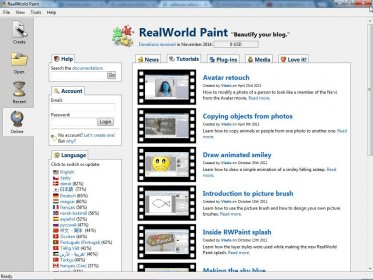
If you want to learn how to use the variety of program's tools, you can access different video tutorials that the developer has uploaded to YouTube. You can watch a list of them with their corresponding links in the startup interface of the program.
The program is absolutely free to use. If you find it useful and want to donate, you can do so at the developer's site.





Comments (3)
better than paint.net in my opinion.